
NiceClock Analog Pro2.1.0 - App Store
You'll be able to see results in few seconds.
Publisher Description
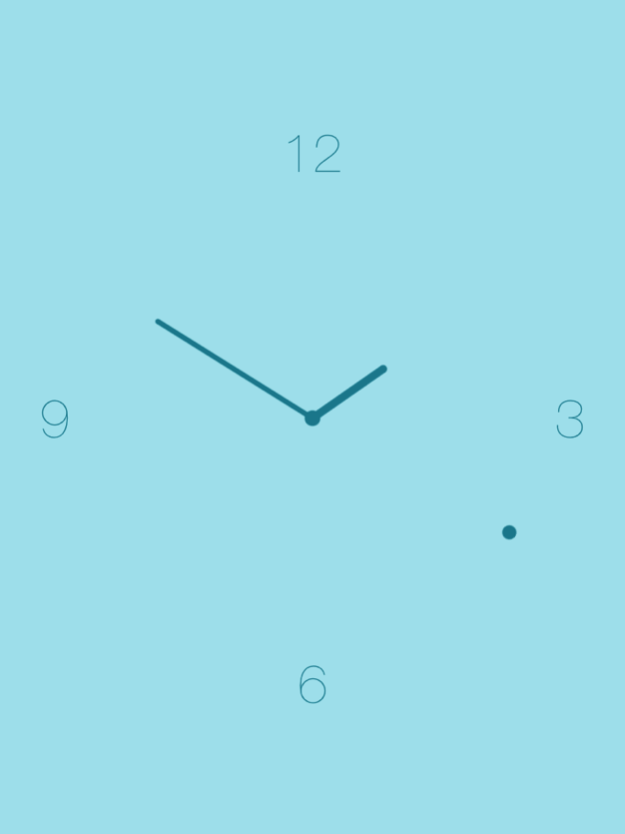



NiceClock Analogue is one of the most beautiful analog clocks for your iOS device.
Put your iPhone into the docking station and let NiceClock Analog do its magic. With the function "Disable Auto-Lock" the app stays open.
Enjoy the nice view of the time with the beautiful design.
You can chose between many nice themes.
Thanks to the new night mode you can use NiceClock Analog with a dimmed screen during night.
Version History - New designs and themes
- New app icon
- New settings button in the clock view, which hides itself after a few seconds
- Open NiceClock with Siri and Shortcuts, optionally straight into night mode
- Dark mode support
- Screen saver mode for OLED screens
- Swipe up to open the settings
- New date formats without a dot after the day
- The clock now ticks exactly in sync with the device clock
- Portrait upside down on iPhone (for compatible devices)
- Improved number size on iPad and when rotating the device
- iOS 26 and iOS 27 compatibility
- Bug fixes and stability improvements 2.1.0 Oct 8 I update NiceClock regularly so we can make it better and more stable. Thank you for using NiceClock!
New in this version:
- Bugfixes and improvements 1.7.11 01/28/2019 We update NiceClock regularly so we can make it better and more stable. Thank you for using NiceClock!
New in this version:
- The night mode is even darker now!
- Fixed a bug in the night mode that sometimes caused the app to crash 1.7.9 11/30/2018 iOS 12 compatibility
New app icon 1.7.5 10/29/2018 This is a big update for NiceClock Analog!
- Night mode can now be activated permanently or just for the current session.
- Support for iPad split-screen
- New layout can be selected
- Roman numerals
- New theme "darker" which is providing an even darker experience in night mode.
- 3D Touch app shortcut directly into the night mode.
- Display optimizations.
- Support for iOS 11
- Small fixes and improvements 1.7 10/06/2017 iPhone 6 / 6+ compatibility 1.0.4 01/25/2015 Simpler nightmode handling. When coming back to the app after the system deactivated the nightmode, it stays deactivated now.
Fixed an issue when the app changed the brightness when changing any settings. 1.0.3 05/04/2014 - New App Icon
- Some improvements in the menu 1.0.2 04/21/2014 iOS 7 compatibility 1.0.1 01/04/2014 1.0 06/05/2013
About NiceClock Analog Pro
The company that develops NiceClock Analog Pro is NiceApps GmbH. The latest version released by its developer is 2.1.0.
To install NiceClock Analog Pro on your iOS device, just click the green Continue To App button above to start the installation process. The app is listed on our website since 2026-10-19 and was downloaded 0 times. We have already checked if the download link is safe, however for your own protection we recommend that you scan the downloaded app with your antivirus. Your antivirus may detect the NiceClock Analog Pro as malware if the download link is broken.
How to install NiceClock Analog Pro on your iOS device:
- Click on the Continue To App button on our website. This will redirect you to the App Store.
- Once the NiceClock Analog Pro is shown in the iTunes listing of your iOS device, you can start its download and installation. Tap on the GET button to the right of the app to start downloading it.
- If you are not logged-in the iOS appstore app, you'll be prompted for your your Apple ID and/or password.
- After NiceClock Analog Pro is downloaded, you'll see an INSTALL button to the right. Tap on it to start the actual installation of the iOS app.
- Once installation is finished you can tap on the OPEN button to start it. Its icon will also be added to your device home screen.
Program Details
System requirements
Download information
Pricing
Version History
version 2.1.0
posted on 2026-10-19
Version History - New designs and themes
- New app icon
- New settings button in the clock view, which hides itself after a few seconds
- Open NiceClock with Siri and Shortcuts, optionally straight into night mode
- Dark mode support
- Screen saver mode for OLED screens
- Swipe up to open the settings
- New date formats without a dot after the day
- The clock now ticks exactly in sync with the device clock
- Portrait upside down on iPhone (for compatible devices)
- Improved number size on iPad and when rotating the device
- iOS 26 and iOS 27 compatibility
- Bug fixes and stability improvements 2.1.0 Oct 8 I update NiceClock regularly so we can make it better and more stable. Thank you for using NiceClock!
New in this version:
- Bugfixes and improvements 1.7.11 01/28/2019 We update NiceClock regularly so we can make it better and more stable. Thank you for using NiceClock!
New in this version:
- The night mode is even darker now!
- Fixed a bug in the night mode that sometimes caused the app to crash 1.7.9 11/30/2018 iOS 12 compatibility
New app icon 1.7.5 10/29/2018 This is a big update for NiceClock Analog!
- Night mode can now be activated permanently or just for the current session.
- Support for iPad split-screen
- New layout can be selected
- Roman numerals
- New theme "darker" which is providing an even darker experience in night mode.
- 3D Touch app shortcut directly into the night mode.
- Display optimizations.
- Support for iOS 11
- Small fixes and improvements 1.7 10/06/2017 iPhone 6 / 6+ compatibility 1.0.4 01/25/2015 Simpler nightmode handling. When coming back to the app after the system deactivated the nightmode, it stays deactivated now.
Fixed an issue when the app changed the brightness when changing any settings. 1.0.3 05/04/2014 - New App Icon
- Some improvements in the menu 1.0.2 04/21/2014 iOS 7 compatibility 1.0.1 01/04/2014 1.0 06/05/2013
version 2.1.0
posted on 2026-10-12
Version History - New designs and themes
- New app icon
- New settings button in the clock view, which hides itself after a few seconds
- Open NiceClock with Siri and Shortcuts, optionally straight into night mode
- Dark mode support
- Screen saver mode for OLED screens
- Swipe up to open the settings
- New date formats without a dot after the day
- The clock now ticks exactly in sync with the device clock
- Portrait upside down on iPhone (for compatible devices)
- Improved number size on iPad and when rotating the device
- iOS 26 and iOS 27 compatibility
- Bug fixes and stability improvements 2.1.0 4d ago I update NiceClock regularly so we can make it better and more stable. Thank you for using NiceClock!
New in this version:
- Bugfixes and improvements 1.7.11 01/28/2019 We update NiceClock regularly so we can make it better and more stable. Thank you for using NiceClock!
New in this version:
- The night mode is even darker now!
- Fixed a bug in the night mode that sometimes caused the app to crash 1.7.9 11/30/2018 iOS 12 compatibility
New app icon 1.7.5 10/29/2018 This is a big update for NiceClock Analog!
- Night mode can now be activated permanently or just for the current session.
- Support for iPad split-screen
- New layout can be selected
- Roman numerals
- New theme "darker" which is providing an even darker experience in night mode.
- 3D Touch app shortcut directly into the night mode.
- Display optimizations.
- Support for iOS 11
- Small fixes and improvements 1.7 10/06/2017 iPhone 6 / 6+ compatibility 1.0.4 01/25/2015 Simpler nightmode handling. When coming back to the app after the system deactivated the nightmode, it stays deactivated now.
Fixed an issue when the app changed the brightness when changing any settings. 1.0.3 05/04/2014 - New App Icon
- Some improvements in the menu 1.0.2 04/21/2014 iOS 7 compatibility 1.0.1 01/04/2014 1.0 06/05/2013
version 1.7.11
posted on 2019-01-28
Jan 28, 2019 Version 1.7.11
I update NiceClock regularly so we can make it better and more stable. Thank you for using NiceClock!
New in this version:
- Bugfixes and improvements
version 1.0.4
posted on 2013-06-06
version 1.7.11
posted on 1970-01-01
28 de jan de 2019 Version 1.7.11
I update NiceClock regularly so we can make it better and more stable. Thank you for using NiceClock!
New in this version:
- Bugfixes and improvements
version 1.7.11
posted on 1970-01-01
28 de ene. de 2019 Version 1.7.11
I update NiceClock regularly so we can make it better and more stable. Thank you for using NiceClock!
New in this version:
- Bugfixes and improvements
version 1.7.11
posted on 1970-01-01
28 янв. 2019 г. Version 1.7.11
I update NiceClock regularly so we can make it better and more stable. Thank you for using NiceClock!
New in this version:
- Bugfixes and improvements
Disclaimer
Official App Store Link
We do not host NiceClock Analog Pro on our servers. We did not scan it for viruses, adware, spyware or other type of malware. This app is hosted by Apple and passed their terms and conditions to be listed there. We recommend caution when installing it.
The App Store link for NiceClock Analog Pro is provided to you by apps112.com without any warranties, representations or guarantees of any kind, so access it at your own risk.
If you have questions regarding this particular app contact the publisher directly. For questions about the functionalities of apps112.com contact us.
